
The traditional 3D design pipeline has long been known as a constraint in current digital production. Historically, making high-fidelity 3D assets would require specialized technical skills, as well as dozens of hours of poly modeling, UV unwrapping, and manual texture painting. But with the advent of generative AI, that’s all about to change, giving indie developers, concept artists, and industrial designers tools to support asset generation without compromising the quality of the results.
One of the platforms leading this revolution is Meshy, an AI 3D model generator that provides a complete platform solution to seamlessly connect from ideation to production-ready assets. Creating prototypes from flat concept art or from written text descriptions to three-dimensional geometry would take days, but with the help of this translation, it can be done in mere seconds. Should you wish to use more focused tools for the neural network to create the texture faster, you can try it here, and map generation can be automated and fed into your asset preparation workflow.
The Evolution of AI-Driven 3D Asset Generation
In contrast to procedural modeling, generative 3D is an important advancement. Developed AI models can decipher the geometry and depth maps of a surface, as well as its topology, using a huge amount of spatial data, without the need to use node trees or manually manipulate meshes. This enables users to create detailed meshes by just typing out the description of the object they want to create or uploading an image of a reference.
It is a fully browser-based suite, so users don’t have to install huge desktop applications or enterprise-grade hardware installations to access the complex rendering algorithms.
Core Generation Capabilities
Modern AI 3D tools come with several input options to suit various stages of the creative process:
- Text-to-3D prompting. Generate full 3D meshes in just a few minutes from a description text prompt for quick visual brainstorming.
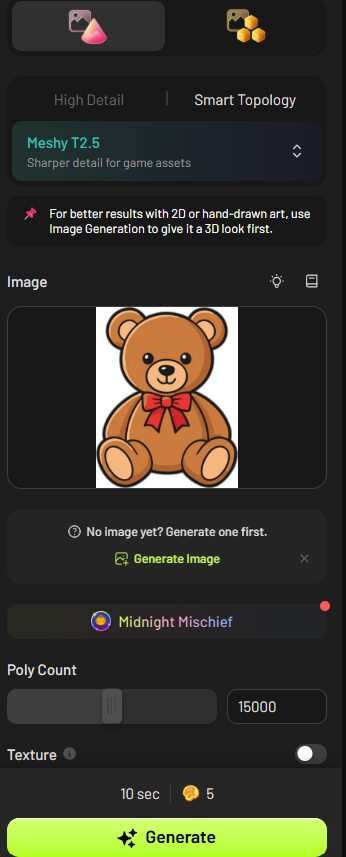
- Image-to-3D conversion: Converts 2D images, drawings, and photos into textured 3D models with accurate geometric proportions.
- Multi-image reconstruction. Supports multi-image input from various angles to greatly improve the spatial accuracy and fidelity of complex objects.
- AI surface texturing. Creates physically based rendering (PBR) maps for a given mesh geometry, such as diffuse, normal, and roughness layers.
- Automated character rigging. Generates automatically bipedal models, including skeletons and skinning weights, required for animation.
These embedded features enable creators to bring their visual ideas to life by seamlessly evolving from raw visual concepts into fully textured assets, all within the same cloud environment.


Integrating AI Assets into Existing Production Pipelines
Studio teams need not give up their existing digital content creation (DCC) software to embrace generative AI. On the contrary, modern platforms serve as shortcut staging grounds for creating base meshes which would be exported directly into tools such as Blender, Unreal, Unity, or Maya.
Ensuring maximum compatibility across a range of industry workflows is crucial for full export format coverage. The results of the activity can be downloaded in common industry formats:
- GLB / glTF. For Web Viewer Integration, Interactive AR Applications, and Mobile Environments.
- FBX. The common format for complex character animation, rigging pipelines, and game engine integration.
- OBJ. Universal geometry exchange format supported by a wide range of legacy 3D applications and sculpting tools.
- STL. High-density geometry for fast prototyping, additive manufacturing, and 3D printing.
In addition to core generation, access to a free tool suite (web browser-based file conversion, interactive model viewing, and automated STL mesh repair tools) ensures that generated models are structurally sound before they’re sent to a 3D printer or real-time game engine.
Step-by-Step: Creating a Production-Ready 3D Asset
Creating an asset from an idea to a game-engine-ready asset is a systematic process that creators can follow to make the most of generative AI.
- Choose input mode. Set the input type (detailed text or reference photos). To get the most accurate structure, upload several angles of your subject.
- Make the base mesh. Compute the first preview generation to look at the silhouette with a low number of polygons. Adjust the prompt or camera settings as needed to fine-tune proportions.
- AI texturing. Add realistic materials, surface weathering, or stylized art styles to your mesh based on context-appropriate text prompts using AI texturing.
- Bipedal character model (optional). If using bipedal character models, trigger the auto-rigging to apply a standard animation skeleton.
- Optimize and export. Use the browser-based toolkit to check the mesh and fix non-manifold edges, then export the finished model as a GLB, FBX, or OBJ file.
Manually interacting with websites can be too time-consuming for production studios and software developers seeking to scale asset generation. By giving engineering teams access to the API, they can incorporate the automated generation of 3D models directly into web applications, e-commerce solutions, custom design tools, or procedural game generation scripts. Organizations can use programmatic endpoints to automate the creation of batches of assets, as well as seamlessly incorporate AI-generated assets into their own proprietary pipelines.
In addition, the standard access offers access to a free tier, enabling individual artists and students, as well as independent developers, to experiment with complete asset creation workflows before expanding to dedicated commercial API tiers.
FAQ
Can AI-generated 3D models be used for physical 3D printing?
Yes. Generated models can be exported directly as high-density STL files. Utilizing integrated STL mesh repair tools ensures that generated geometry is watertight and free of non-manifold edges prior to printing.
How does multi-image input improve model accuracy?
When uploading a single image, the AI must infer hidden back surfaces and depth. Providing multi-image input from multiple angles gives the neural network precise spatial references, resulting in significantly higher geometric fidelity.
What hardware is required to run browser-based 3D generation?
Because all heavy neural network computation and mesh rendering occur on remote cloud servers, users only need a basic web browser and a standard internet connection—no high-end GPUs or dedicated workstations required.